
BCBSMA MyBlue Member App
BCBSMAMedical
4.7636.00 Reviews
- Version
- 7.47
- Installs
- 100.00K
- Age Rating
- Everyone
Screenshots
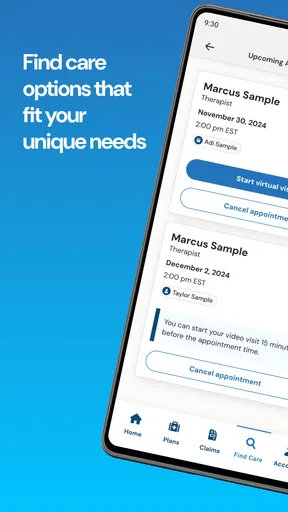
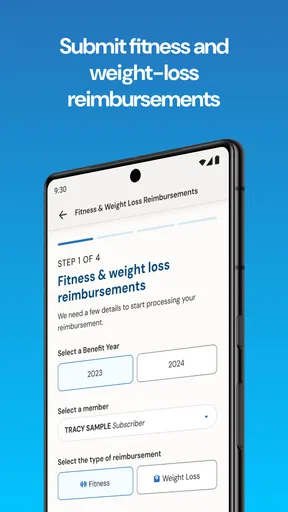
Our Review of BCBSMA MyBlue Member App
 Analysis by Appyee
When I open a health-insurance app, I am usually trying to solve a small problem quickly: check whether a doctor visit is covered, find information for an upcoming appointment, or understand what I may need to do next. That is the situation where BCBSMA MyBlue Member App makes the most sense. It is a free medical app from BCBSMA for Blue Cross Blue Shield of Massachusetts members, rather than a general health tracker or symptom checker.
My first impression is that its value depends less on entertainment or clever extras and more on whether it reduces the effort of dealing with insurance. That is an important distinction. I would not install it expecting medication reminders, exercise coaching, or a replacement for professional medical advice. I would install it because keeping membership information and insurance tasks close at hand can be easier than searching through emails, carrying paperwork, or repeatedly visiting a desktop site.
The app has built a solid reputation among its audience, with a 4.7 average from around 1.9 thousand ratings and more than 100 thousand installs. Those figures suggest that many members find it useful, although they should not be mistaken for a guarantee that every plan or situation will feel equally straightforward. Insurance apps are highly dependent on the member’s plan, the provider involved, and the task being attempted.
From an upcoming appointment to a completed insurance task
I’d begin with one concrete question—what information will help me feel prepared for the appointment? That keeps the task focused and makes it easier to distinguish an insurance question from something the provider’s office should answer. Once the appointment is over, I can carry those same details into a billing or coverage follow-up, rather than starting from memory.
Starting with the problem I actually need to solve
A realistic use case begins a day or two before an appointment. I might know the name of the physician and the date of the visit, but still feel unsure about the practical details: Is the provider associated with my coverage? What information will I need at check-in? Where can I find the membership details that the office may ask for?
Instead of treating the app as a place to browse, I use it as a starting point for a specific task. That mindset helps because insurance applications can contain several areas that look relevant at first. I would begin with the membership or plan information connected to my Blue Cross Blue Shield of Massachusetts account, then move toward the details that match the appointment or billing question.
This is also where I would set expectations for a family member. The app is intended for members, so it is most useful when the person using it has the appropriate account access and knows whose coverage is involved. If I am helping a relative, I would keep the member’s information and the purpose of the task clear rather than assuming that my own account view automatically answers questions about someone else.
The age rating is Everyone, which fits the practical nature of the app. Still, an all-ages rating does not mean that a child can independently manage insurance decisions. I see it as an indication that the app’s content is suitable for a broad audience, while account ownership and healthcare responsibility remain important in real use.
Moving through the task instead of searching blindly
Once I am inside, I would follow one question at a time. For an appointment, that means checking the member-facing information first, identifying what is relevant to the visit, and then saving myself from switching between unrelated sections. For a billing concern, I would begin with the information connected to the charge or claim rather than trying to interpret the entire plan at once.
That step-by-step approach is one of the less obvious ways to make an insurance app feel easier. I do not expect the app to translate every healthcare term into plain English automatically, so I would note unfamiliar wording before contacting the insurer or provider. Having the exact term, date, and context ready makes the next conversation more productive than simply saying that “the app looks wrong.”
A useful habit is to open the app before leaving for an appointment, not while standing at the reception desk. That gives me time to notice an incorrect login, an outdated piece of information, or a question that needs human help. The app can shorten the handoff between member and provider, but it cannot remove the need to prepare.
I would also avoid treating a screen in the app as a final medical answer. Coverage information and healthcare guidance are different things. If I am worried about symptoms, treatment, or an urgent situation, I would contact an appropriate healthcare professional or emergency service rather than using a member app to make a clinical decision.
The handoff between member, provider, and insurer
The strongest part of this kind of app is the handoff. I may start with a question at home, show or use the relevant membership information at a provider’s office, and later need to follow up with BCBSMA about a claim or coverage detail. Keeping the first step on my phone can make those transitions less fragmented.
For example, imagine that I have an appointment after work. Before leaving, I check my member information and make a note of the provider’s name and the reason for the visit. At check-in, I can respond more confidently if the office asks for coverage details. If a later bill raises a question, I have a clearer starting point: I know which visit I am referring to and can compare the bill with the information I already reviewed.
That workflow does not mean every issue is resolved inside the application. A provider’s billing office may still need to correct something on its side. The insurer may need to explain a benefit or review a claim. The app’s role is to give me a more organized place to begin and, when appropriate, continue the conversation.
This is where I think the app compares favorably with paper documents. A printed card or letter can be useful, but it is easy to leave at home or lose among other paperwork. A desktop browser can offer a larger view, but it is less convenient when I am away from my computer. The mobile app sits between those options: more immediate than paper and more portable than a full website, while potentially less comfortable for long explanations or detailed comparisons.
What a successful result looks like
For me, success is not simply opening the app. The result is reaching the next action with less uncertainty. That might mean arriving at an appointment with the relevant member details available, understanding which question belongs with the provider, or knowing that an insurance issue requires direct follow-up instead of more searching.
The app is particularly useful for people who regularly need access to their member information while away from home. It can also suit someone who dislikes keeping insurance documents in several places. I would recommend it to a Massachusetts Blue Cross Blue Shield member who wants a phone-based starting point for routine insurance tasks and prefers checking information independently before calling.
I would be more cautious about recommending it to someone who rarely uses digital accounts, has difficulty reading dense insurance language, or expects a single tap to settle complicated coverage disputes. In those cases, the app may still help gather details, but personal assistance from the insurer or provider could be the better route.
Where the workflow can break
The main friction is built into the subject matter. Insurance information is not always simple, and an app cannot make every plan rule intuitive. A member may find the right screen but still need an explanation of what a benefit means in a particular situation. That is not necessarily a failure of the interface; it is a reminder that displaying information and interpreting it are separate jobs.
Another possible weak point is the gap between what the member sees and what a provider’s office has processed. If a doctor’s office has submitted information differently, or if a billing question concerns a recent event, the app may not immediately provide the complete answer I want. I would avoid making a rushed decision based on one screen when money, treatment, or appointment access is involved.
Mobile convenience also has limits. A phone is excellent for a quick check, but less pleasant for comparing several documents or reading a long explanation. If I needed to examine a complicated issue carefully, I might prefer a larger browser view or a direct conversation with BCBSMA. The app is a practical front door, not necessarily the best workspace for every insurance problem.
Because the application is tied to BCBSMA membership, it is not the right choice for someone covered by another insurer. It also is not a general-purpose medical reference, a fitness app, or a substitute for a provider’s patient portal. If my goal is to review clinical notes, message a doctor, or manage a treatment plan, I would look to the healthcare provider’s own system instead.
Small habits that make it more useful
I would keep the app as part of a simple preparation routine rather than opening it only during a crisis. Before an appointment, I would check the relevant member information, write down any unfamiliar terms, and separate questions for the provider from questions for the insurer. That three-way split prevents a common waste of time: asking the wrong organization to solve the wrong problem.
I would also verify the context before sharing anything at a reception desk. If I am handling coverage for another household member, I would make sure I am looking at the correct member information. This sounds basic, but it is an easy mistake when several people use the same phone or when multiple appointments are scheduled close together.
For a billing issue, I would keep the date of service and provider name beside my notes. I would not rely on memory alone, especially if I have several visits or family members to track. The app can be the place where I begin the review, while my notes preserve the details needed for a clear follow-up.
Finally, I would update the application when an update is available through the normal app store process. The current version is 7.47, and the app supports operating systems from 7.1 onward. That broad compatibility is helpful for people using older devices, although the experience can still vary with a phone’s age, screen size, and general performance.
How it fits beside the usual alternatives
Compared with calling customer service first, the app gives me more control for routine lookups and lets me prepare before speaking with someone. The trade-off is that I must interpret what I see and recognize when self-service has reached its limit. A call is slower at the beginning but may be more effective when the issue involves exceptions, confusing terminology, or a dispute.
Compared with a desktop member website, the app is more convenient when I am traveling to an appointment or need information away from a computer. The website may feel better for extended reading and careful document review. I see the two formats as complementary rather than competing: mobile for quick access and preparation, larger screens for deeper review.
Compared with a provider’s patient portal, BCBSMA MyBlue serves a different part of the healthcare journey. The provider portal is usually where I would expect clinical communication and visit-specific care information. This app is the more relevant place to begin with insurance membership and coverage-related tasks. Confusing those roles can lead to unnecessary frustration, so I would choose the tool based on whether my question is about care or coverage.
The app is free, which removes a financial barrier to trying it. That does not make it universally useful, because its value depends on being a BCBSMA member and having a task that belongs in an insurer’s member service. For the right user, free mobile access is a sensible convenience; for everyone else, it is simply the wrong tool.
My final take after following the whole process
I see BCBSMA MyBlue as a focused companion for the administrative side of healthcare. Its best use is a complete but modest workflow: start with a membership question, locate the information connected to the task, carry the relevant details into a provider or insurer conversation, and use the result to decide the next step.
What I appreciate most is not the idea of having insurance on a phone by itself. It is the way the app can reduce the small gaps between home preparation, appointment check-in, billing review, and follow-up. Those gaps are where people often lose time or forget details. The app gives me a more orderly starting point, provided I stay realistic about what an insurer’s self-service tool can answer.
My recommendation is straightforward: if you are a Blue Cross Blue Shield of Massachusetts member and want convenient access to your member-facing insurance information, I would try it. Keep a provider portal and direct support available for questions that involve medical records, complex explanations, or disagreements. The best result comes from using the app as the first step in a workflow, not as the entire healthcare system.
Developed by BCBSMA, the app has been available since June 26, 2015, and its Everyone rating makes it approachable for households that need a simple mobile entry point. With its 4.7 average and free access, it is an easy recommendation for routine member tasks, but my honest advice is to install it with a clear purpose: use it to prepare, check, and organize, then hand complicated matters to the people who can actually resolve them.
Verdict
Strengths of BCBSMA MyBlue Member App
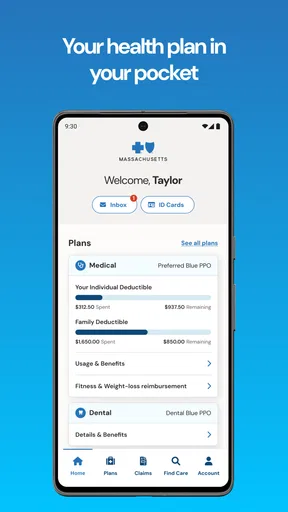
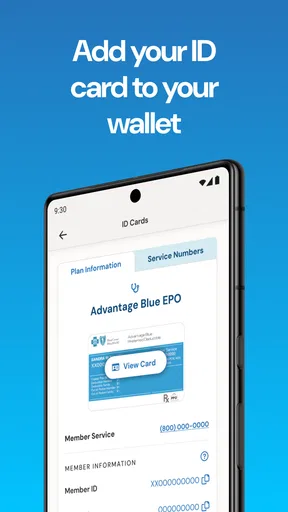
- Quick access to digital member ID cards and coverage details.
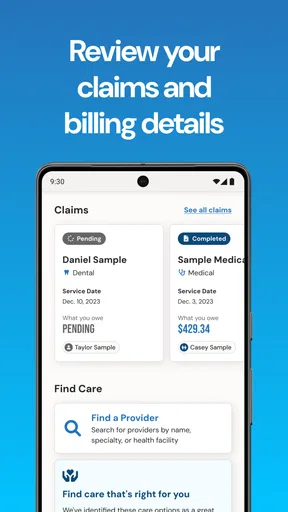
- Find in-network doctors, hospitals, and pharmacies from your phone.
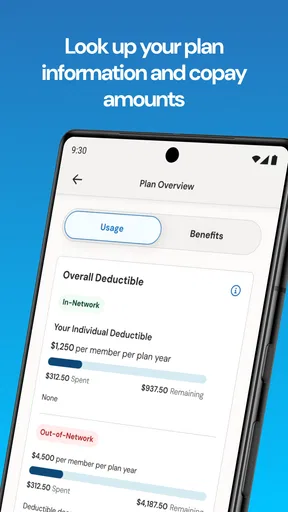
- Securely view claims, deductibles, copays, and out-of-pocket spending.
- Useful tools for checking prescription coverage and medication costs.
- Lets members contact support without searching for phone numbers.
Limitations of BCBSMA MyBlue Member App
- Some features may require a separate login or identity verification.
- Provider and cost information may not always reflect the latest updates.
- Certain services can be unavailable during maintenance or outages.
- The app is mainly useful to BCBSMA members, limiting its broader appeal.
- Claims and benefit details may take time to appear after recent activity.
Similar Picks in This Category
View All
WebMD: Symptom Checker
WebMD, LLC4.1

Microphone Amplifier
DOSA Apps4.2

Anatomy Learning - 3D Anatomy
3D Medical OU4.5

Period Tracker and Calendar
SimpleInnovation4.9

GoodRx: Prescription Coupons
GoodRx4.8

CVS Health
CVS Pharmacy4.5
Frequently Asked Questions
What is the BCBSMA MyBlue Member App used for?
The BCBSMA MyBlue Member App is designed for Blue Cross Blue Shield of Massachusetts members who want to manage their health plan from a mobile device. After signing in, members can generally review coverage details, access digital member information, check claims and benefits, search for in-network providers, view plan documents, and find helpful contact or support options without needing to use the full website.
Who can use the BCBSMA MyBlue Member App, and how do I sign in?
The app is intended for eligible Blue Cross Blue Shield of Massachusetts members, rather than the general public. You typically need an existing MyBlue account and your login credentials to access personal plan information. New users may need to register through the official member portal first. Depending on the device and account settings, the app may also support security features such as biometric sign-in or verification codes.
Can I use the app to find doctors, hospitals, and other in-network providers?
Yes, one of the most useful features for members is provider search. The app can help you look for doctors, specialists, hospitals, pharmacies, and other healthcare professionals associated with your plan network. Search results may depend on your selected plan, location, specialty, and current directory information, so it is still wise to confirm network participation directly with the provider before scheduling care.
Can I view claims, benefits, and deductible information in the app?
The MyBlue Member App is intended to give members convenient access to important plan and claims information. Depending on your specific insurance plan and the latest app version, you may be able to review claim status, benefit usage, deductible progress, out-of-pocket amounts, coverage information, and related documents. Health plan details can vary, so the app should be used as a convenient reference rather than a substitute for official assistance when something is unclear.
Is the BCBSMA MyBlue Member App free, and is my personal information secure?
The app is generally available to eligible members without a separate download fee, although normal mobile data charges may apply. Because it provides access to sensitive health insurance and personal information, you should download it only from the official Google Play Store or Apple App Store and keep your device updated. Use a strong password, enable available security options, avoid sharing login details, and sign out on shared devices.
